One-time provisioning
Firmware installer
One-time wired provisioning installs PyBLE-enabled MicroPython. Then develop over Bluetooth Low Energy from the tablet-first PyBLE app. Firmware v0.6.1 is available for all five board profiles following qualification confirmed by the project owner.
Validated display board
Waveshare ESP32-S3-LCD-1.47B
PyBLE on real hardware, not a render. Match your board to this exact B-version before choosing its firmware.
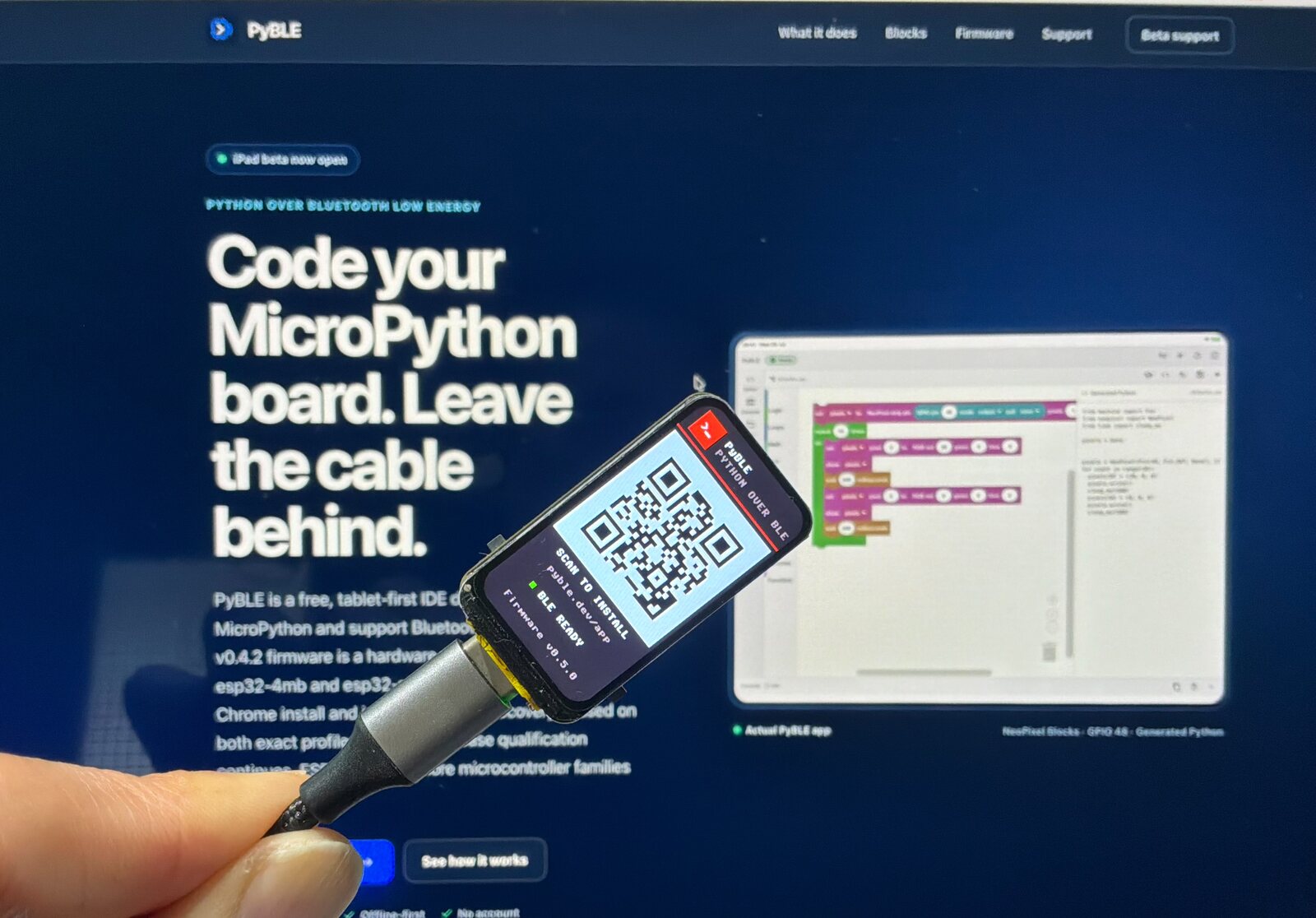
This board uses the separate waveshare-esp32-s3-lcd-147b image. Its own manifest and immutable firmware bytes are never aliased to the lean generic S3 image. It requires the exact B-version board with 16 MiB flash and 8 MiB Octal PSRAM.
The lean esp32-s3-n16r8 image does not bundle this board's display driver, companion module, pin constants, boot hook, or splash machinery.
Use the B version shown here. Non-B display wiring differs and is not covered by this installer claim.
- Integrated display172 × 320 ST7789V3 TFT with the board's published SPI wiring.
- Explicit MicroPython runtimeFirmware includes the inert
pyble_st7789user library andpyble_waveshare_lcd147bcompanion for ordinary Python and Blockly TFT programs. - Fresh-install boot splashAfter a fresh erased installation, the PyBLE/app-QR boot splash is shown by default. You can persistently disable or re-enable it; it never detects or selects the board automatically.
In the installer, select waveshare-esp32-s3-lcd-147b, confirm the exact B-version board and N16R8 memory topology, and verify that profile's own release bytes. Use the same BOOT/RESET recovery sequence documented below if automatic reset does not enter the ROM loader.
Why a cable here?
Provision over USB. Develop over BLE.
A board needs the PyBLE-enabled MicroPython firmware before it can advertise PBLE/1. The wired step establishes that foundation. Afterward, the PyBLE app connects, transfers files, runs code, and streams the console over Bluetooth Low Energy.
Choose the exact module profile
- esp32-4mbClassic ESP32 module with 4 MiB flash; no PSRAM required.
- esp32-s3-n16r8ESP32-S3 module with 16 MiB flash and 8 MiB Octal PSRAM. This lean, board-neutral image is not for every ESP32-S3 board. It does not bundle
pyble_st7789,pyble_waveshare_lcd147b, exact-board pins, or the display boot splash. - waveshare-esp32-s3-lcd-147bExact ESP32-S3-LCD-1.47B B version with 16 MiB flash and 8 MiB Octal PSRAM. This separate image bundles its display runtime and fresh-install splash support.
- esp32-c3-4mbESP32-C3 revision v0.3 or newer with 4 MiB flash; no PSRAM required.
- rpi-pico2-wRaspberry Pi Pico 2 W (RP2350 + CYW43439). Provisioned by a verified UF2 download and a manual BOOTSEL copy, not a Web Serial flow.
Two provisioning methods
- ESP Web Tools · Web SerialDirect browser installation for the four exact ESP profiles — esp32-4mb, esp32-s3-n16r8, waveshare-esp32-s3-lcd-147b, and esp32-c3-4mb — after manifest and firmware verification.
- Pico 2 W · BOOTSEL / UF2Verify and download the UF2, then copy it to the mounted RP2350 BOOTSEL volume. This is not an ESP Web Tools flow.
Before you connect
- ESP targets use Web SerialThe four ESP profiles install through Web Serial and Web Crypto in a current desktop Chromium browser over HTTPS. iPadOS cannot perform this wired ESP provisioning step.
- Pico 2 W does not use Web SerialThe rpi-pico2-w flow needs only a secure context with Web Crypto: it verifies and downloads the UF2 for a manual BOOTSEL-volume copy.
- Data-capable USB and stable powerBack up board files and close other serial tools first. ESP installation erases the device; copying the UF2 overwrites the installed firmware.
ESP Web Tools is licensed under Apache-2.0 and is loaded from the exact package bundled with this website—never from a runtime CDN.
Recovery
Recover an interrupted flash
Installing PyBLE erases the board's existing firmware and user workspace. Back up user files before installing. Use a normal USB connection with a data-capable cable and stable power, close every serial monitor or application holding the port, and select the correct serial port.
Try automatic reset first. If it fails, use the manual BOOT/RESET sequence: hold BOOT, tap RESET, then release BOOT. Button labels vary by board.
It is safe to retry after permission denial, disconnect, timeout, interrupted erase, interrupted write, verification failure, or when a board no longer boots. Close serial monitors, reconnect USB, manually enter the ROM bootloader, reload this page, and retry the same verified profile. The installer rechecks the reviewed SHA-256 metadata root and selected artifacts before it exposes the install action.
For advanced merged-image recovery with the same version-matched bundle bytes, run the command for the exact selected ESP profile:
python -m esptool --chip esp32 write_flash 0x1000 esp32-4mb/firmware.binpython -m esptool --chip esp32s3 write_flash 0x0 esp32-s3-n16r8/firmware.binpython -m esptool --chip esp32s3 write_flash 0x0 waveshare-esp32-s3-lcd-147b/firmware.binpython -m esptool --chip esp32c3 write_flash 0x0 esp32-c3-4mb/firmware.bin
As an advanced diagnostic or recovery alternative, the component offsets are: bootloader at 0x1000 for classic ESP32 or 0x0 for ESP32-S3 and ESP32-C3, partition table at 0x8000, and application at 0x10000. Use only the component files from that same bundle.
After flashing, perform a hard reset or power cycle. Expect the board to advertise as PyBLE-XXXX, then make the first connection from the PyBLE app.
Pico 2 W recovery: the merged-image commands and component offsets above apply only to the ESP profiles, never to the Pico 2 W. After an interrupted or failed copy, disconnect the board, hold BOOTSEL while reconnecting USB, wait for the RP2350 volume, then re-verify and copy the same versioned UF2 again. Wait for the automatic reboot and confirm the PyBLE-XXXX BLE advertisement. Pico provisioning does not use Web Serial or the ESP ROM recovery controls.
Repeated resets, flash-size or PSRAM startup errors, or no BLE advertisement can indicate a wrong memory profile. Stop instead of trying random images, then use the support route. Safe diagnostic fields to share are the release version, profile ID, board model or module marking, browser/OS versions, failed stage, and redacted error text. Do not share secrets or personal device labels.